BillSnap Receipt Scanner App.
Snap receipts.
Export in one tap.
BillSnap turns messy receipts into clean, ready to send PDF and CSV reports. Perfect for tax filing, expense claims, audit records, and accountant review, in seconds.

What is BillSnap?
BillSnap is a premium receipt scanner and export app for iPhone, built by Kenneth Hing in Singapore. It lets you scan receipts in seconds and export clean PDF or CSV reports in one tap. BillSnap is designed for tax filing, expense reimbursement, audit records, and accountant review, making it the fastest way to turn receipts into ready to send documents.
Now available on the Apple App Store, BillSnap supports SGD, handles common Singapore receipt formats, and keeps your data private on your device.
In 30 seconds
- Scan any receipt in under 3 seconds with your iPhone camera.
- Auto organize by merchant, date, and category with smart OCR.
- Export a clean PDF or CSV in one tap, with custom date ranges.
- Ready for tax filing, expense claims, audits, and accountant review.
- Private by design. Your receipts and photos stay on your device.
- Built in Singapore by Kenneth Hing, a financial advisory representative.
Export receipts in one tap
Clean PDF included every time, with optional CSV for spreadsheets. Ideal for tax filing, reimbursement, and accountant review, all ready to send.
Scan in seconds
Point, snap, done. BillSnap reads the total, merchant, and date for you.
Snap. We handle the rest.
Scan receipts in seconds. BillSnap reads, records, and organizes every detail for you, so nothing gets lost in a drawer again.
-
One-tap capture
Photo or upload. BillSnap works with paper receipts and screenshots.
-
Smart fields
Merchant, date, total, and category detected automatically.
-
Safe archive
Your receipt photos stay on your device and are easy to find later.
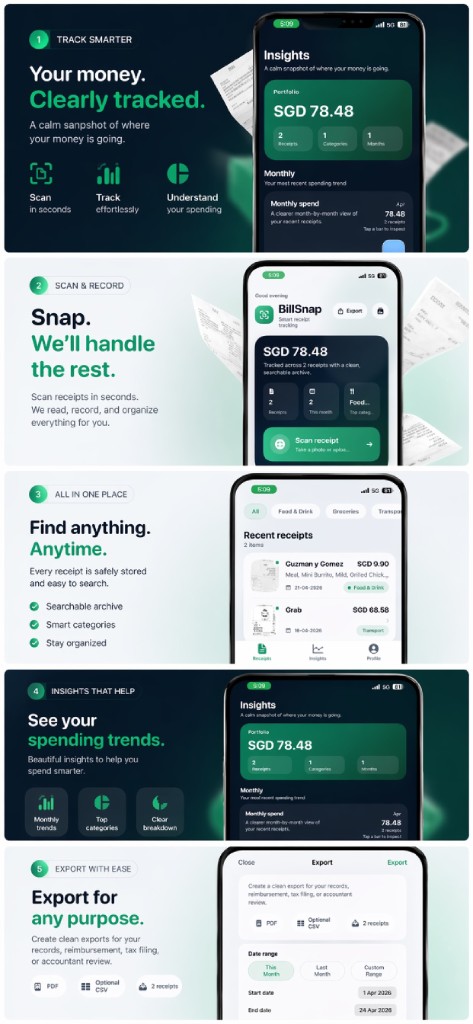
See your spending.
Stay in control.
A calm snapshot of where your money is going. Visualize trends, spot top categories, and understand your monthly patterns at a glance.
Track trends
Visualize your spending over time.
Clear overview
Receipts and categories at a glance.
Monthly insights
Understand patterns and save more.
Export every receipt.
In one tap. Anytime.
The strongest feature of BillSnap. Turn months of receipts into a clean PDF or CSV, ready for tax, reimbursement, and accountant review. No formatting, no spreadsheets, no stress.
-
PDF in every export
Beautifully formatted, ready to send. Every receipt is filed with merchant, date, category, and total.
-
Optional CSV for spreadsheets
Add a clean CSV when you need numbers your accountant, HR, or spreadsheet can understand.
-
Any date range you want
This month, last month, or a custom range. Perfect for monthly claims or year end tax.
-
Built for real purposes
Personal records, reimbursement, tax filing, accountant review. Pick the purpose, BillSnap formats it right.

One export. Every scenario covered.
From year end tax to last minute claims, BillSnap gives you a clean, professional file for whoever needs it.
Tax Filing
Ready for tax anytime. Export a full year of receipts in one clean PDF when IRAS season arrives.
Claims Submission
Submit claims in seconds. Pick a date range, hit export, send to HR or finance. Done before lunch.
Audit Records
Stay audit ready, always. Every receipt is archived with date, merchant, and category. Never scramble again.
Send to Accountant
Share one clean file. PDF plus CSV your accountant will actually thank you for. No reformat, no follow ups.
Whatever the purpose,
BillSnap has the file.
Ready for tax. Ready for claims. Ready for audits. Ready for your accountant. All from one tap.
Three simple steps. Zero friction.
From messy receipts to a clean record, in under a minute.
Snap a receipt
Take a photo or upload. BillSnap reads the key details instantly.
Auto organize
Receipts are sorted by category, date, and merchant. Searchable forever.
Export in one tap
The magic moment. Pick a date range, choose PDF or PDF plus CSV, and send it to tax, HR, or your accountant.
Designed for real life. Not spreadsheets.
Instant capture
Snap a receipt in under three seconds.
Smart categories
Food, transport, groceries, and more.
Powerful search
Find any receipt by date, merchant, or category.
Clean archive
Keep photos safely filed for later reference.
Edit anything
Tweak merchant, total, or category anytime.
Monthly view
A clean month-by-month breakdown.
Secure & private
Your data stays safe and private.
Fast export
PDF and optional CSV in one tap.
Every screen, carefully crafted.
BillSnap FAQ
Clear answers to the most common questions about the BillSnap receipt tracker app.
What is BillSnap?
How does BillSnap export receipts?
Is BillSnap free?
Which devices does BillSnap support?
Can I use BillSnap for Singapore tax filing?
Where are my receipts stored?
Is BillSnap private and secure?
Who built BillSnap?
Can I export receipts for my accountant?
Export receipts in one tap.
Ready when you are.
BillSnap AI is available now on the App Store. Clean PDF and CSV exports, tax and reimbursement ready, designed for iPhone.
An app by Kenneth Hing.